How to Select the Perfect Ergonomic Tools and Gifts for Landscape and Gardening Professionals
Mar 26th 2026
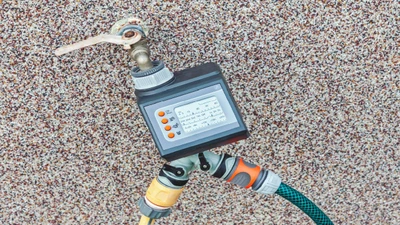
Bring the brilliance of Smart Irrigation directly to your outdoor faucet with the Orbit B-hyve XD Smart Hose Timer. As Orbit's first true hybrid hose tap device, the XD offers unparalleled flexibility by allowing you to program your watering schedule locally via the B-hyve mobile app using built-in Bluetooth 4.2 technology. Available in single, two-port, and four-port configurations, it seamlessly handles everything from a simple lawn sprinkler to a multi-zone drip irrigation kit setup.
Want to take your automation to the next level? By pairing your XD timer with the Orbit B-hyve Gen 2 Wi-Fi Hub (sold separately), you instantly activate its powerful Smart features. This upgrade grants you remote internet access from anywhere in the world and enables WeatherSense technology, automatically delaying your watering schedule during rain, high winds, or freezing temperatures to conserve water and protect your plants.
Detailed specifications for system planning.
| Specification | Details |
|---|---|
| Product Type | Hybrid Bluetooth/Wi-Fi Hose Timer |
| Available Models | 1-Port, 2-Port, and 4-Port Configurations |
| Inlet/Outlet Threads | 3/4" Standard Hose Thread (FHT Inlet / MHT Outlets) |
| Operating Pressure | 10 to 100 PSI |
| Wireless Connectivity | Bluetooth 4.2 Built-In (Wi-Fi requires Gen 2 Hub) |
| App Compatibility | iOS 13.5+ / Android 5.0+ |
| Power Source | Two (2) AA Alkaline Batteries (Not Included) |
| Warranty | 2-Year Manufacturer Warranty |
Get your smart hose timer running in four easy steps.
Step 1: Install Batteries
Squeeze the tabs on the battery tray to remove it from the back of the timer. Insert two fresh AA alkaline batteries, then firmly push the tray back in until it clicks to ensure a waterproof seal.
Step 2: Connect to Faucet
Thread the timer's top swivel connection onto your standard 3/4" outdoor hose spigot. Hand-tighten securely to prevent leaks, but do not use wrenches or pliers.
Step 3: Download the App
Search for the "B-hyve" app in the Apple App Store or Google Play Store. Download it to your smartphone and create a free account.
Step 4: Pair and Program
Turn on your phone's Bluetooth and follow the in-app prompts to pair with your new XD timer. You can program schedules locally via Bluetooth, or pair it with an Orbit Gen 2 Wi-Fi Hub to unlock remote internet access and smart weather delays.
Does this timer require a Wi-Fi hub to work?
No, a Wi-Fi hub is not strictly required. Out of the box, the timer connects directly to your phone via Bluetooth for local programming. However, a hub is needed for remote internet access.
Adding the Orbit Gen 2 Wi-Fi Hub unlocks critical smart features, including automatic weather delays and the ability to control your watering while on vacation.
Can I run multiple hoses at the same time?
Yes, if you choose the 2-port or 4-port model, you can run multiple zones. Each port can be programmed with its own completely independent watering schedule.
Please ensure your home's outdoor faucet provides enough water pressure and flow if you plan to overlap schedules and run multiple ports simultaneously.
What batteries does the B-hyve XD timer use?
The timer requires two AA alkaline batteries, which are not included in the box. We highly recommend using fresh, high-quality name-brand batteries for maximum lifespan.
Do not use rechargeable batteries. They operate at lower voltages and can cause Bluetooth connectivity drops or valve malfunction.
Will this timer automatically adjust for rain?
Yes, but only if paired with an Orbit Gen 2 Wi-Fi Hub. With the hub connected, the timer pulls local weather data to implement automatic rain delays.
Without the hub, the XD acts as a standard Bluetooth timer and must be manually delayed via the app or the physical button on the unit.
Is this timer safe to leave out in the winter?
No, the timer should not be left outdoors in freezing temperatures. Freezing water expanding inside the valve will crack the internal components and void your warranty.
Before the first frost, disconnect the timer from the faucet, remove the batteries, and store the unit indoors until spring.

Please note the requirements for this unit:
Ensure your smart irrigation system is fully equipped with these recommended DripWorks components:
Mar 26th 2026
Mar 25th 2026
Mar 24th 2026
Mar 23rd 2026