Unlock Smart Wi-Fi Control for Your B-hyve Ecosystem
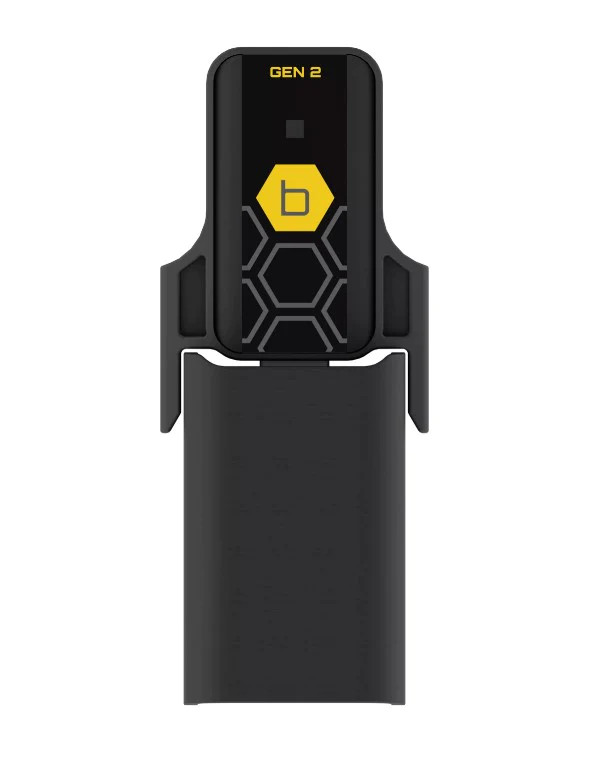
The Orbit B-hyve Gen 2 Wi-Fi Hub acts as a powerful USB bridge, instantly upgrading your standard B-hyve Bluetooth devices to full internet connectivity. By connecting this hub to your home network, you enable the complete suite of Smart Wi-Fi features inherent in the B-hyve ecosystem. Whether you are managing smart landscape controllers, hose faucet timers, flow meters, or leak detectors, this central bridge gives you total command of your watering schedule from anywhere in the world.
Featuring the latest chipsets and advanced processing capabilities, the Gen 2 Wi-Fi Hub ensures a next-generation water management experience. Once connected, your timers can pull real-time local weather data to implement smart watering delays during rain or freezing conditions. Pair your upgraded B-hyve hose timers with one of our complete Large Garden Bed Kits to fully automate your landscape's hydration with unparalleled efficiency and control.
Why Choose the Orbit Gen 2 Wi-Fi Hub?
- Global Access: Transition your B-hyve Bluetooth devices to Wi-Fi, allowing you to control and monitor your irrigation from anywhere using your smartphone.
- WeatherSense Technology: Enables smart watering adjustments by pulling local live weather feeds to pause schedules during rain, wind, or freezing temperatures.
- Next-Gen Chipset: The Gen 2 model features advanced internal hardware for faster, more stable connections between your network and outdoor devices.
- Ecosystem Integration: Serves as the central command bridge for multiple B-hyve products, including hose timers and smart leak detectors.
- Easy Setup: Plugs directly into a standard indoor USB power adapter and pairs quickly via the free B-hyve app.
Technical Specifications
Detailed specifications for system planning.
| Specification |
Details |
| Product Type |
Smart Wi-Fi Bridge / Hub |
| Compatibility |
Orbit B-hyve Bluetooth Devices |
| Connectivity |
2.4 GHz Wi-Fi & Bluetooth |
| Environment |
Indoor Use Only |
| Power Requirement |
USB Power Adapter (Standard 110V Outlet) |
| MPN |
21027 |
| Brand |
Orbit |
How to Set Up the Wi-Fi Hub
Get your smart ecosystem connected in minutes.
Step 1: Plug it In
Insert the Gen 2 Wi-Fi Hub into a USB power adapter and plug it into a standard indoor electrical outlet. Ensure the outlet has a strong Wi-Fi signal from your router.
Step 2: Open the App
Download or open the free Orbit B-hyve app on your iOS or Android smartphone and log into your account.
Step 3: Connect to Wi-Fi
Tap the option to add a new device, select the Wi-Fi Hub, and follow the on-screen prompts to connect the hub securely to your home's 2.4 GHz Wi-Fi network.
Step 4: Pair Your Devices
Once the hub is online, link your existing B-hyve Bluetooth hose timers or controllers to the hub within the app to enable remote internet access and smart weather features.
Frequently Asked Questions
Do I need this hub to use my B-hyve Bluetooth timer?
No, the hub is optional. Your Bluetooth timer works locally via your phone. However, this hub is required if you want to control the timer from anywhere via Wi-Fi.
Adding the hub also unlocks advanced capabilities like automatic weather delays based on local forecasts.
Can this hub be installed outdoors?
No, the Orbit Gen 2 Wi-Fi Hub is strictly designed for indoor use. It must be plugged into a dry, standard 110V indoor outlet within range of your router.
To ensure a strong connection, try to plug the hub into an outlet that is relatively close to the wall where your outdoor hose timers are located.
How many devices can connect to one Wi-Fi Hub?
A single Orbit Gen 2 Wi-Fi Hub can support multiple B-hyve devices within range, allowing you to manage several hose timers or leak detectors from one central bridge.
Check the B-hyve app documentation for the exact maximum limit, but it easily accommodates the needs of an average residential garden.
Does this hub require a 2.4 GHz or 5 GHz Wi-Fi network?
The Orbit Gen 2 Wi-Fi Hub requires a standard 2.4 GHz Wi-Fi network to operate. It will not connect to 5 GHz-only networks.
Most modern home routers are dual-band. Make sure your phone is temporarily connected to the 2.4 GHz band during the initial setup process.
✔ Compatibility Check
Please note the requirements for this unit:
- Indoor Use Only: Must be plugged into a dry, indoor outlet.
- Wi-Fi Requirements: Requires an active 2.4 GHz home Wi-Fi network.
- Ecosystem: Designed exclusively to bridge Orbit B-hyve Bluetooth devices. It does not control non-smart valves directly.
Complete Your System
Enhance your smart irrigation setup with these recommended DripWorks components:
- Large Garden Bed Kit: The perfect comprehensive drip irrigation kit to automate with your newly Wi-Fi-enabled hose timer.
- 1/2" Mainline Tubing: The foundation of any robust drip irrigation system, carrying water exactly where your plants need it.
- Home Garden Filter: Protect your investment by filtering out debris before it reaches your drip emitters.
- Pressure Regulator (30 PSI): A vital component to step down your household water pressure to safe levels for drip lines.
Downloads
Relevant Tips & Guides