Smart, Expandable Irrigation Control for Any Landscape
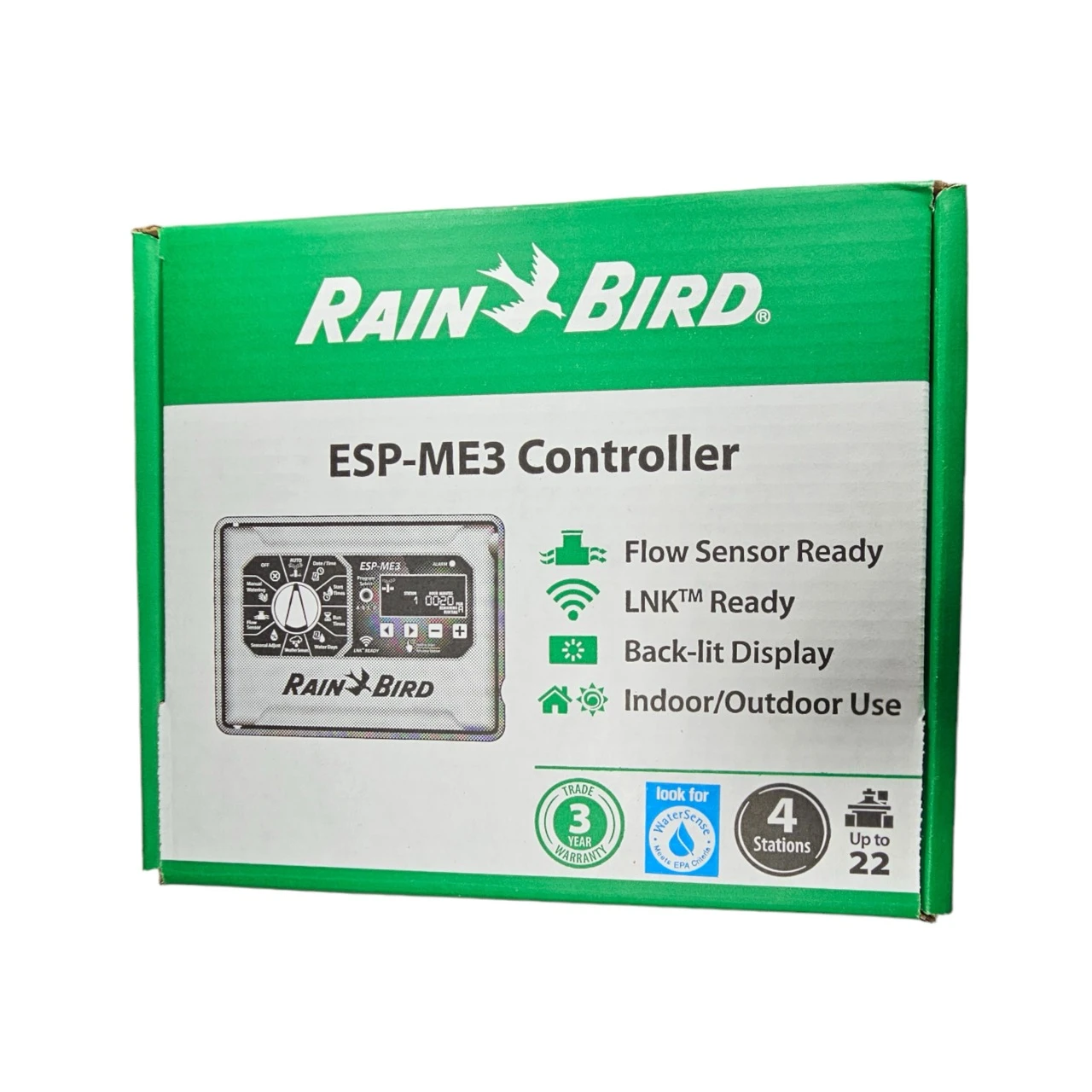
The Rain Bird 4-Station Irrigation Controller (F55410) is an incredibly versatile, AC-powered timer designed for both indoor and outdoor installations. Perfect for growing landscapes, this base model starts with 4 stations but is highly expandable up to 22 total zones using hot-swappable 3-station or 6-station expansion modules. When paired with standard 24V AC irrigation valves, it delivers professional-grade automation that scales precisely to your property's needs.
Built for modern convenience, the F55410 is fully compatible with the Rain Bird LNK Wi-Fi module (sold separately). Simply plug the module in to access, operate, and monitor your entire irrigation system from any smartphone or tablet. Packed with advanced water-saving features like Cycle+Soak, flow sensing capabilities, seasonal adjustments, and a robust 10-year lithium backup battery, this Rain Bird controller ensures your plants receive the perfect amount of water with minimal effort.
Why Choose the Rain Bird F55410 Controller?
- Massive Expandability: Starts at 4 zones and easily expands up to 22 zones using hot-swappable Rain Bird expansion modules.
- Wi-Fi Ready: Fully compatible with the Rain Bird LNK Wi-Fi module, allowing for remote smartphone control and smart weather adjustments.
- Advanced Scheduling: Offers 4 individual programs with 6 independent start times each, plus custom days, odd/even, and cyclical watering options.
- Water-Saving Features: Includes Cycle+Soak to prevent runoff, seasonal adjust, and flow sensing capabilities to automatically detect leaks.
- Reliable Memory: Features non-volatile memory and a 10-year life lithium battery that safely maintains your time and date during power outages.
- Indoor & Outdoor Rated: Housed in a durable cabinet suitable for exposure to the elements or neat indoor mounting.
Technical Specifications
Detailed specifications for system planning.
| Specification |
Details |
| Controller Type |
AC Powered, Modular Expandable |
| Stations |
4 Base Stations (Expandable up to 22) |
| Power Input |
120V AC (Internal Transformer) |
| Operating Voltage |
24VAC 50/60Hz Output |
| Programs & Start Times |
4 Programs, 6 Start Times per Program |
| Backup Power |
10-Year Life Lithium Battery (Built-in) |
| Compatible Valves |
Standard 24V AC Solenoid Valves |
| Smart Upgrades |
Rain Bird LNK Wi-Fi Module Compatible |
| Brand |
Rain Bird |
| MPN |
F55410 |
How to Set Up: A Step-by-Step Guide
Get your modular AC controller running smoothly.
Step 1: Mount the Enclosure
Secure the housing to an indoor or outdoor wall using appropriate mounting hardware. Ensure you have safe access to a reliable 120V AC electrical source.
Step 2: Connect AC Power
Wire the controller's internal transformer to your 120V AC power supply according to local codes. (Professional installation is recommended for hardwiring).
Step 3: Wire the Valves
Run multi-strand direct burial wire from your 24V AC valve manifolds to the controller. Connect the common wire to the common terminal and the individual valve wires to the numbered station terminals.
Step 4: Program & Expand
Use the dial and buttons to set your schedules. If expanding, simply snap in additional expansion modules. If using Wi-Fi, plug in the LNK module and follow the app instructions to connect.
Frequently Asked Questions
Does the Rain Bird F55410 include Wi-Fi out of the box?
No, the Rain Bird F55410 is Wi-Fi compatible but requires the separate Rain Bird LNK Wi-Fi module to connect to your smartphone and home network.
Once the LNK module is plugged in, you gain full access to remote monitoring and intelligent weather-based adjustments via the Rain Bird app.
How many stations can the Rain Bird F55410 handle?
The base model controls 4 stations out of the box, but it easily expands up to 22 total stations using hot-swappable 3-station or 6-station expansion modules.
This allows your controller to grow effortlessly alongside your expanding landscape and garden beds.
What valves work with the Rain Bird F55410 controller?
This controller must be paired with standard 24V AC irrigation valves. It outputs 24VAC power and will not operate battery-powered DC latching solenoids.
Ensure all valves in your manifold are AC-compatible before wiring them into the station terminals.
How should I prepare my Rain Bird F55410 for spring watering?
Prepare the Rain Bird F55410 for spring by testing your AC valve connections, checking your Wi-Fi module if installed, and setting a conservative watering schedule utilizing the seasonal adjust feature.
As the season warms up, simply adjust the global percentage upward to easily increase run times across all active stations.
✔ Compatibility Check
Please note the requirements for this AC-powered controller:
- Power Source: Requires hardwired 120V AC power. It does not operate as a standalone battery controller.
- Wi-Fi Module Not Included: Requires the Rain Bird LNK Wi-Fi module (sold separately) for smartphone capabilities.
- Requires AC Valves: Must be paired with standard 24V AC irrigation valves. It will not operate DC latching solenoids.
Complete Your System
Ensure your multi-zone AC irrigation setup is ready to run with these recommended products:
- 24V AC Irrigation Valves: Browse our selection of highly reliable AC inline valves to pair perfectly with your new controller.
- Direct Burial Wire: Multi-strand wire necessary for connecting remote AC valves back to the timer.
- 1/2" Mainline Tubing: The standard backbone for delivering water from your manifold directly to your landscape beds.
- Pressure Regulators: Essential for dropping high municipal pressure down to safe operating levels for drip systems.
Downloads
Relevant Tips & Guides