Smart, Weather-Based Irrigation Control from Anywhere
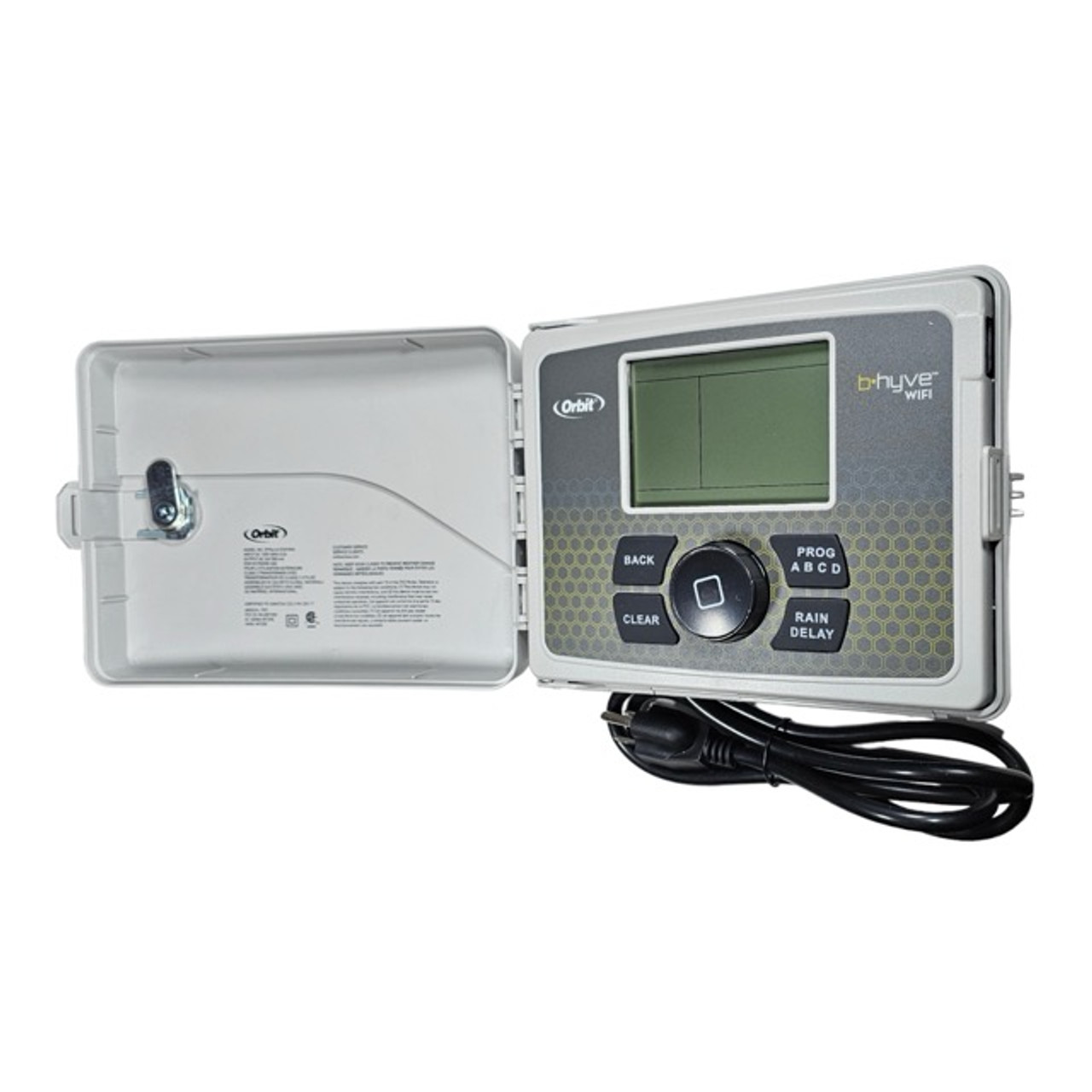
The Orbit B-hyve Smart Indoor/Outdoor Irrigation Controller revolutionizes the way you manage your landscape. Featuring an EPA WaterSense certification, this smart controller ensures maximum water conservation without sacrificing the health of your plants. It utilizes a durable, weather-resistant case designed for easy installation either indoors or outdoors. By pairing this powerful 110V AC controller with standard 24V AC irrigation valves, you gain complete, professional-grade automation over your entire yard.
The true power of the B-hyve lies in its advanced WeatherSense technology. By analyzing site-specific conditions—including soil type, slope, sun/shade exposure, historical ET data, and live local weather feeds—the controller automatically adjusts your watering schedules to deliver the exact amount of water needed. The highly rated B-hyve app (available for Android, iOS, and Web) gives you the freedom to monitor and program your timer from anywhere in the world, or simply let the smart software run the system for you.
Why Choose the Orbit B-hyve Smart Controller?
- WeatherSense Technology: Automatically adjusts watering schedules based on live weather feeds, soil type, and site conditions to optimize plant health and save water.
- Global App Control: Manage your irrigation system from anywhere using the fully functional B-hyve app on iOS, Android, or web devices.
- WaterSense Certified: EPA approved for exceptional water efficiency, which may qualify you for local utility rebates.
- Indoor & Outdoor Ready: Built with a durable, secure, and weather-resistant case that allows for flexible mounting locations.
- Versatile Programming: Program your watering schedules on the app, directly at the timer faceplate, or let the smart software create a custom program for you.
Technical Specifications
Detailed specifications for system planning.
| Specification |
Details |
| Controller Type |
Smart Wi-Fi AC Controller |
| Application Type |
Indoor / Outdoor |
| Power Input |
110V AC Outlet Required |
| Compatible Valves |
Standard 24V AC Solenoid Valves |
| Smart Capabilities |
Wi-Fi Connectivity, WeatherSense Adjustments |
| App Compatibility |
iOS, Android, and Web Browser |
| Certifications |
EPA WaterSense Approved |
| Brand |
Orbit |
How to Set Up: A Step-by-Step Guide
Get your smart Wi-Fi controller running in minutes.
Step 1: Mount the Enclosure
Select an indoor or outdoor wall location that has a strong Wi-Fi signal and access to a 110V AC electrical outlet. Use the included hardware to secure the weather-resistant case.
Step 2: Connect Power & Valves
Plug the controller into your 110V outlet. Run multi-strand direct burial wire from your 24V AC valve manifolds to the controller, connecting the common and individual station wires to the corresponding terminals.
Step 3: Download the App
Download the free B-hyve app on your iOS or Android smartphone and create a secure account.
Step 4: Pair & Program
Follow the app prompts to pair the controller to your local Wi-Fi network. Input your site details (soil type, sun exposure, plant types) to allow WeatherSense to generate a custom, automated watering schedule.
Frequently Asked Questions
Does the Orbit B-hyve Smart Controller require an electrical outlet?
Yes, the Orbit B-hyve controller requires a standard 110V AC electrical outlet to operate. It is not a battery-powered standalone unit and must be plugged into a reliable power source.
The 110V power is stepped down internally to properly actuate your 24V AC irrigation valves.
What valves work with the Orbit B-hyve controller?
This AC-powered controller must be paired with standard 24V AC irrigation valves. It will not operate DC latching solenoids commonly used with battery-operated timers.
Ensure all valves in your system manifold are strictly AC-compatible before wiring them into the station terminals.
Do I have to use my smartphone to run the system?
No, while the B-hyve app unlocks advanced WeatherSense features and remote control, the controller features an onboard interface that allows you to manually program and run watering schedules directly at the timer.
However, connecting to Wi-Fi is necessary to access the live weather feeds and EPA WaterSense water-saving benefits.
How should I prepare my Orbit B-hyve for spring watering?
Prepare the Orbit B-hyve for spring by verifying your Wi-Fi connection in the app, checking your 24V AC valve wiring, and enabling the smart WeatherSense feature to accommodate early-season rain.
The software will automatically delay watering during heavy spring showers and scale up durations as the weather begins to dry out.
✔ Compatibility Check
Please note the requirements for this smart Wi-Fi controller:
- Power Source: Requires a standard 110V AC electrical outlet. It does not run on battery power.
- Wi-Fi Connection: A reliable 2.4 GHz Wi-Fi network connection is required to utilize the B-hyve app and WeatherSense features.
- Requires AC Valves: Must be paired with standard 24V AC irrigation valves. It will not operate DC latching solenoids.
Complete Your System
Ensure your smart AC irrigation setup is ready to run with these recommended products:
- 24V AC Irrigation Valves: Browse our selection of highly reliable AC inline valves to pair perfectly with your Orbit controller.
- Direct Burial Wire: Multi-strand wire necessary for safely connecting remote AC valves back to the timer.
- 1/2" Mainline Tubing: The standard backbone for delivering water from your manifold directly to your landscape beds.
- Pressure Regulators: Essential for dropping high municipal pressure down to safe operating levels for drip systems.
Downloads
Relevant Tips & Guides