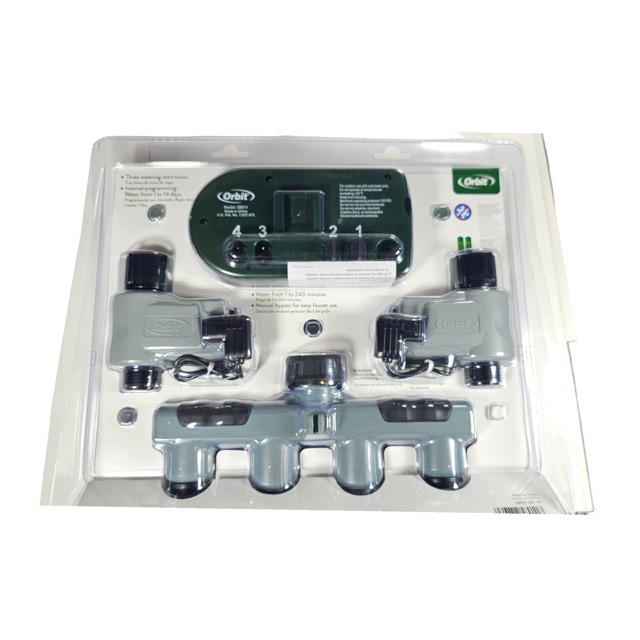
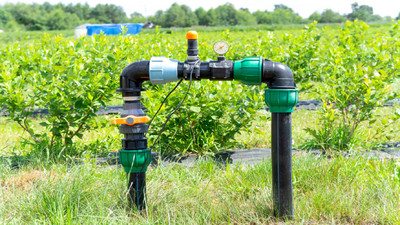
Control Up to Four Watering Zones from a Single Spigot
The Orbit Multi-Valve LCD Timer is the ultimate solution for gardeners who need to manage multiple irrigation zones without the hassle of installing a complex underground manifold. This comprehensive system includes a 4-outlet manifold, the digital controller, and two individual valves right out of the box. Need to expand? You can easily add up to two more valves to control a total of four distinct watering zones. To ensure the longevity of the valves, we highly recommend attaching a water filter and pressure regulator downstream of each zone before connecting to your drip mainline.
Programming is straightforward using the large, easy-to-read LCD screen. Operating on a single program, the timer runs your active valves in sequence, allowing you to set completely independent watering durations (from 1 to 240 minutes) for each zone. This prevents pressure loss by ensuring no two zones run simultaneously. Built with standard female hose thread (FHT) inlets and male hose thread (MHT) outlets, it connects quickly to any standard garden hose faucet, making multi-zone automation completely accessible.
Why Choose the Orbit Multi-Valve Timer?
Multi-Zone Control: Easily splits one outdoor faucet into multiple automated zones. It comes with 2 valves, but the manifold supports up to 4.
Sequential Watering: The timer intelligently runs each valve one after the other. This maintains high water pressure in your system by preventing simultaneous runs.
Independent Durations: While sharing the same start times, each individual valve can be programmed with its own specific watering duration (1 to 240 minutes).
Easy Programming: The large LCD screen and dial/button interface make setting up your schedules incredibly intuitive.
Expandable System: Start with the included two zones, and seamlessly purchase and plug in additional valves as your landscape grows.
Technical Specifications
Detailed specifications for system planning.
Specification
Details
Number of Zones
Includes 2 valves (Expandable up to 4 valves)
Connection Type
Standard Female Hose Thread (FHT) Inlet x Male Hose Thread (MHT) Outlets
Get your multi-zone system running in just a few simple steps.
Step 1: Install Batteries
Remove the timer module from the manifold, open the battery tray, and insert two fresh AA industrial alkaline batteries. Snap the timer back into place.
Step 2: Attach Manifold to Faucet
Screw the main female hose thread (FHT) swivel inlet of the 4-port manifold directly onto your outdoor spigot. Hand-tighten firmly to prevent leaks.
Step 3: Connect Valves & Head Assemblies
Attach the two included electronic valves to the threaded ports on the manifold. From there, attach a water filter and pressure regulator downstream of each valve before connecting your drip tubing.
Step 4: Program the Timer
Using the LCD screen, set your current time, desired start times, and watering frequency. Finally, set a specific watering duration for Valve 1 and Valve 2 independently.
Frequently Asked Questions
How many zones can this timer control? This system can control up to 4 independent watering zones. It comes with 2 valves in the box, and you can easily purchase and attach 2 additional valves to the manifold.
Each valve connects directly to the manifold and is recognized automatically by the digital timer module.
Do the valves water at the same time? No, this timer runs the valves sequentially. When the programmed start time is reached, Valve 1 runs for its duration, followed immediately by Valve 2, and so on.
Sequential watering prevents major pressure drops in your system, ensuring your drip emitters and sprinklers receive optimal flow.
What batteries does the Orbit Multi-Valve timer require? It requires two AA industrial alkaline batteries, which are not included. We strongly advise against using rechargeable batteries, as they may not provide enough voltage for consistent operation.
To avoid skipped watering cycles, we recommend changing the batteries at the beginning of every spring season.
Does this timer require water pressure to work? Yes, the internal diaphragm valves require a minimum of 25 PSI to properly open and close. It will not work on zero-pressure setups like rain barrels.
If you are working with a gravity-fed or low-pressure rain barrel system, you will need a specialized zero-pressure mechanical timer instead.
✔ Compatibility Check
Verify this multi-zone timer matches your system needs:
Pressure Requirement: Requires a minimum of 25 PSI to operate the diaphragm valves. Not suitable for gravity-fed systems.
Warning:
This product can expose you to Lead, which is known to the State of California to cause cancer and birth defects or other reproductive harm. For more information go to www. P65Warnings.ca.gov.
Related Resources
Drip Irrigation
Drip Irrigation: 5 Simple Steps to Installing a Raised Bed System
Apr 1st 2026
Raised bed gardening is one of the most efficient and productive ways to grow vegetables, herbs, and
…