Rugged, Standalone Watering for Remote Irrigation Zones
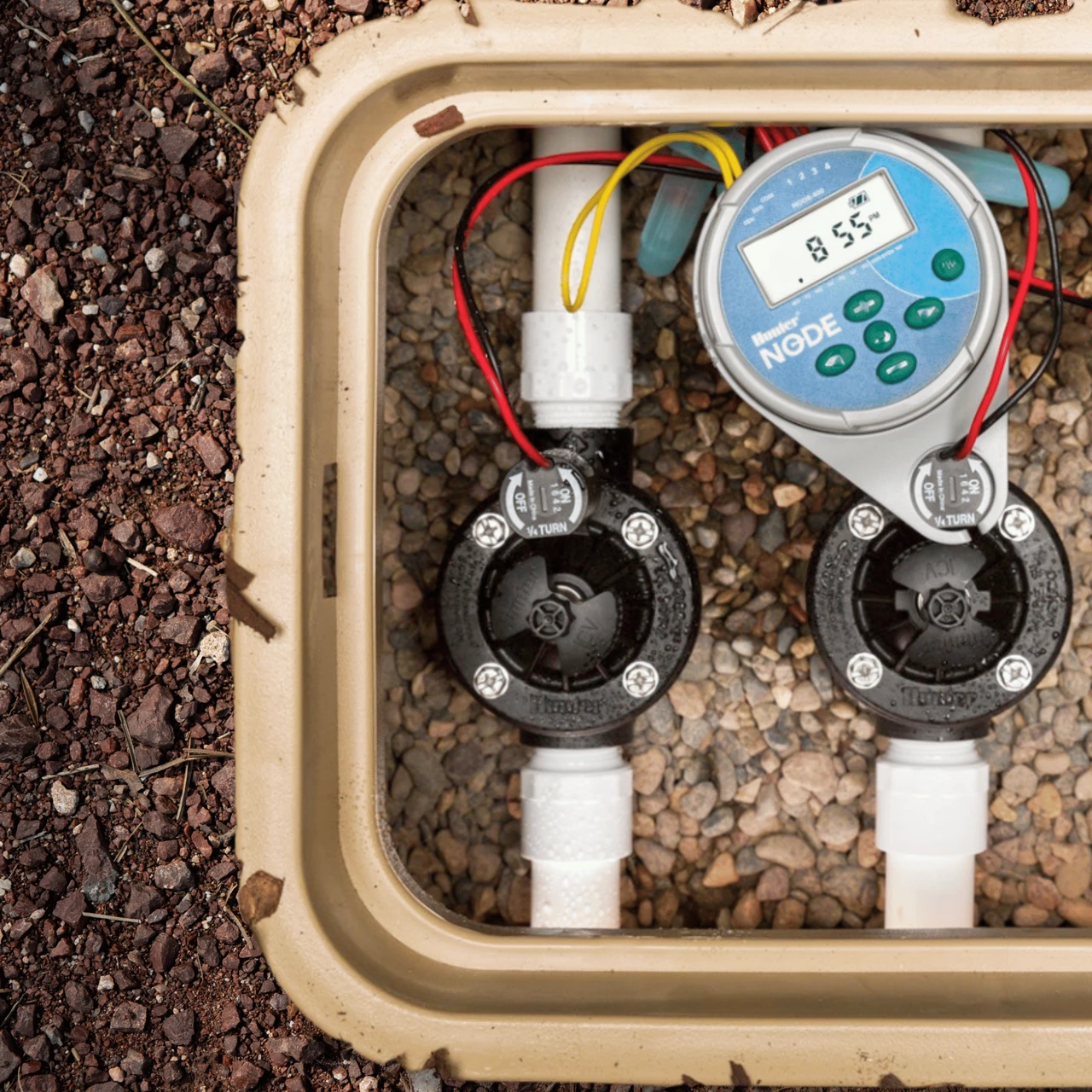
The Hunter NODE 1-Station Battery Operated Controller with DC Solenoid is the ultimate, highly reliable solution for temporary irrigation sites, isolated greenhouses, and power-restricted landscape areas. When running traditional AC wire is impossible or too expensive, this standalone LCD timer provides complete automated control directly at the valve. To ensure reliable performance and protect the included DC solenoid from debris, we highly recommend installing a water filter upstream in your system.
Engineered with Hunter's legendary solid construction, the NODE features a robust waterproof enclosure seal that protects against water damage, allowing it to easily handle severe weather and flooded underground valve boxes. Programming is exceptionally simple using the built-in LCD screen and rubberized button interface. The controller mounts quickly and easily directly to the solenoid without the need for screws, drills, or extra mounting hardware. Offering flexible scheduling with 3 programs, 4 start times per program, and the ability to suspend irrigation for up to 99 days, the NODE provides professional-level water management powered by a single 9-volt battery.
Why Choose the Hunter NODE Controller?
- Waterproof Construction: The rugged enclosure is fully sealed, ensuring flawless operation even when fully submerged in a muddy valve box.
- Easy-to-Read LCD: Features a clear, intuitive LCD screen and push-button interface for quick programming right at the valve site.
- Direct Mounting: Mounts directly and securely to the included DC latching solenoid quickly—no additional brackets, drills, or screws required.
- Flexible Scheduling: Provides 3 distinct watering programs (A, B, C) with 4 start times each, allowing for complex, multi-cycle watering regimens.
- Master Valve Control: Advanced circuitry provides the ability to manage a master valve or pump start relay if required by your specific system design.
Technical Specifications
Detailed specifications for system planning.
| Specification |
Details |
| Number of Stations |
1 Zone (Includes DC Latching Solenoid) |
| Power Source |
1 x 9-Volt Alkaline Battery (Not Included) |
| Programs & Start Times |
3 Programs (A, B, C) with 4 Start Times each |
| Watering Duration |
Up to 6 hours per start time |
| Suspend Irrigation |
Programmable off up to 99 days |
| Valve Compatibility |
Designed for use with Hunter DC Valves |
| MPN |
NODE-100 |
| Warranty |
2 Years |
How to Set Up: A Step-by-Step Guide
Follow these steps to successfully install and program your Hunter NODE.
Step 1: Install the Battery
Unscrew the waterproof rear battery compartment and insert one fresh 9-volt industrial alkaline battery. Secure the cap tightly to maintain the protective seal against water damage.
Step 2: Install the Solenoid
Remove the existing AC solenoid from your Hunter valve body and thread the included DC latching solenoid in its place. Hand-tighten until secure.
Step 3: Mount and Wire
Splice the two wires from the solenoid to the corresponding wires on the NODE using waterproof wire connectors. Then, snap the NODE controller directly onto the top of the solenoid mounting bracket.
Step 4: Program the Controller
Use the rubberized buttons and LCD screen to set the current time, date, and your desired watering schedule (days, run times, and start frequencies).
Frequently Asked Questions
Does this timer connect to Bluetooth or Wi-Fi?
No, this is the standard standalone model that is programmed directly using the built-in LCD screen. If you require smartphone control, you should look for the Hunter NODE-BT version.
This standard version is highly preferred by users who want a simple, reliable interface directly at the valve site without relying on a mobile app.
Is this controller fully waterproof?
Yes, the Hunter NODE features a heavy-duty waterproof enclosure seal. It is completely safe to install in underground valve boxes, even those prone to flooding or severe weather.
To ensure it remains waterproof, always double-check that the battery cap is threaded on tightly and that you are using silicone-filled waterproof wire nuts for the splices.
Can I use this with a standard 24V AC irrigation valve?
No, battery-operated timers require a DC latching solenoid to operate correctly. Fortunately, this specific unit includes the compatible Hunter DC latching solenoid in the box.
You will simply unscrew your existing 24V AC solenoid from your valve body and replace it with the included DC version.
How long does the battery last?
A single, high-quality 9-volt alkaline battery will typically power the controller for an entire watering season. We recommend replacing the battery annually at the beginning of spring.
Using generic or rechargeable batteries is not recommended, as they may not provide sufficient voltage to trigger the solenoid over an extended period.
✔ Compatibility Check
Please note the following installation requirements:
- Battery Required: Requires one 9V Industrial Alkaline Battery. Do not use rechargeable batteries.
- Power Type: This operates a DC Latching solenoid (included). It will not operate 24V AC solenoids.
- Run Time: Supports continuous watering durations up to a maximum of 6 hours per cycle.
Complete Your System
Ensure your remote irrigation setup runs perfectly with these recommended add-ons:
- 9V Alkaline Batteries: Required to power the controller and solenoid. Ensure you start the season with a fresh, name-brand battery.
- Irrigation Valve Boxes: Even though it's waterproof, a valve box protects your NODE and valve from foot traffic, UV rays, and lawn equipment.
- Water Filters: Install upstream to keep debris from clogging the valve's diaphragm and preventing proper shutoff.
- Pressure Regulators: Essential for lowering high city water pressure so it doesn't blow out your delicate drip irrigation fittings downstream.
Downloads
Relevant Tips & Guides